Why Should Old TXT Records Be Cleaned Up in DNS-01 Validation?
More than one TXT record can exist under the same DNS-01 name. But as old records accumulate, the DNS response can grow and Let’s Encrypt may reject it.
After a certificate renewal, it can be confusing to find several TXT records with the same _acme-challenge name in the DNS control panel. Each one is not necessarily an error: DNS-01 validation can use multiple TXT records at one name. Still, leaving those records indefinitely is not a sound housekeeping practice. Let’s Encrypt can start rejecting a DNS-01 response when it becomes too large. The goal is to retain values needed for current validations while removing temporary values that are no longer needed.
At a glance
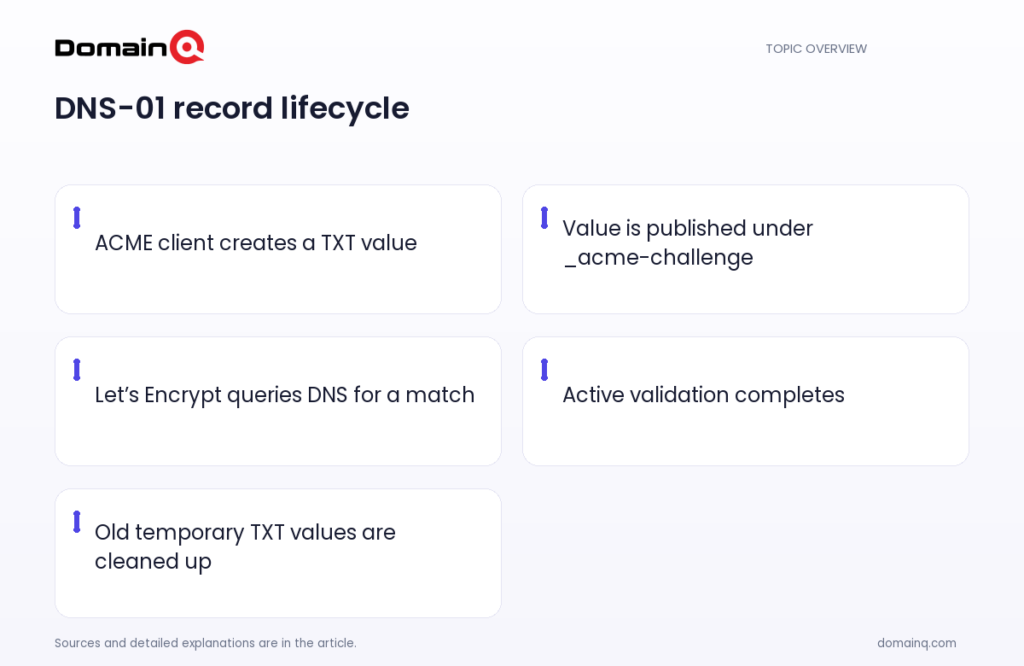
- In DNS-01 validation, an ACME client creates a TXT value at _acme-challenge and Let’s Encrypt looks up that value through DNS.
- Multiple TXT records can exist at the same DNS name, including when wildcard and non-wildcard validations run at the same time.
- Old TXT records should be cleaned up. If the DNS response becomes too large, Let’s Encrypt can start rejecting the DNS-01 response.
- Validation should not be triggered before a new record has propagated; where a provider cannot check propagation automatically, the client should wait long enough.
What does the TXT record do in DNS-01 validation?
DNS-01 is an ACME validation method that proves control of a domain through DNS. The ACME client first receives a token. It then creates a TXT value derived from that token and its account key at _acme-challenge.yourdomain. Let’s Encrypt queries DNS and, if it finds a matching value, certificate issuance can proceed.
This TXT record is not related to the ordinary text content of a website. It is temporary DNS data used for validation. For a broader distinction between record types, see DNS records explained: A, CNAME, MX and TXT.
- The TXT value is based on the token received by the ACME client and its account key.
- For DNS-01, the record name follows the form _acme-challenge.yourdomain.
- Let’s Encrypt looks for a matching value in its DNS query.
Source: [1]
Why can several TXT records appear at the same name?
A DNS name can have multiple TXT records. Therefore, seeing several values under _acme-challenge does not by itself mean that validation has failed.
This can happen, for example, when validations for a wildcard certificate and a non-wildcard certificate are running at the same time. DNS-01 also allows wildcard certificates to be issued. Where multiple validations are active, the required TXT values may therefore appear together at the same name.
Example scenario: assume one validation is running for example.com while another is started for *.example.com. If both use DNS-01, multiple TXT values can appear at _acme-challenge.example.com. In this example, the right task is not to treat the number of values as an error by itself, but to distinguish values still needed by ongoing validations.
- Multiple TXT values can exist at the same DNS name.
- Simultaneous wildcard and non-wildcard validations are one example.
- Wildcard certificates can be issued with DNS-01.
Source: [1]
Why should old records be removed?
Permission for multiple TXT records at one name does not mean that old values should remain permanently. Let’s Encrypt specifically says that old TXT records should be cleaned up.
The reason is DNS response size. As unused values accumulate, the response to an _acme-challenge query can grow. If the response becomes too large, Let’s Encrypt will start rejecting it. In that situation, the validation may not proceed even if the current and correct TXT value exists.
For that reason, cleanup does not mean deleting records indiscriminately. First preserve values needed by validations that are still in progress. Then remove old values that are no longer used. If more than one certificate or automation process uses the domain, plan deletion with other active validations in mind.
- Old TXT values can increase the DNS response size.
- If the response becomes too large, Let’s Encrypt can start rejecting it.
- Cleanup should remove only values that are no longer needed.
Source: [1]
Do not trigger validation before propagation
Adding or removing a TXT record may not become visible across all of a DNS provider’s servers immediately. Most DNS providers have a propagation time between updating a record and making it available on all their servers.
If your provider offers a way to check automatically that an update has fully propagated, use that information to manage validation timing. Without such a method, configure the ACME client to wait long enough before triggering validation. According to Let’s Encrypt, that wait can sometimes be as much as an hour.
This waiting consideration matters when adding a new TXT value and when carefully reviewing records after old values are cleaned up. However, the source does not specify a cleanup-specific waiting time, so follow the propagation-checking approach of your provider and client.
- DNS updates can take time to propagate.
- Without automatic propagation checks, the client must wait long enough.
- That wait can sometimes be as much as an hour.
Source: [1]
A practical cleanup routine for temporary ACME records
A regular process helps prevent unnecessary TXT accumulation. Before a certificate operation, review the _acme-challenge name; during the operation, retain values for active validations; after it completes, review temporary values that are no longer required. This approach helps clean up without disrupting simultaneous validations that share the same name.
When using automation, test how the client creates the DNS record, waits for propagation, and removes the record after the operation. During testing, also consider cases where wildcard and non-wildcard validations occur at the same time. The purpose is not to delete every TXT record immediately, but to prevent old values outside the current validation from accumulating.
- Review existing _acme-challenge values before the operation.
- Keep values used by validations in progress.
- Remove unnecessary temporary values left by completed operations.
- Where there is no propagation check, configure the client’s waiting period.
Source: [1]
Practical checklist
- Review TXT values under the _acme-challenge name.
- Identify certificate validations in progress and the values they need.
- Check whether wildcard and non-wildcard validations are running simultaneously.
- Remove old temporary TXT values that are no longer needed.
- Find out whether your DNS provider checks propagation status automatically.
- If it does not, configure the client to wait long enough before validation.
- When starting a new validation after cleanup, check that only required current values are present.
Multiple TXT records under DNS-01 can be normal, especially during simultaneous wildcard and non-wildcard validations. The real issue is uncontrolled accumulation of values that are no longer used. Retaining records for active validations and cleaning up old temporary values is the basic housekeeping step that reduces unnecessary DNS response growth and the risk that Let’s Encrypt will reject the response.
Frequently asked questions
Are multiple TXT records under the same _acme-challenge name an error?
No. Multiple TXT records can exist at the same DNS name. This can occur when validations for wildcard and non-wildcard certificates run at the same time.
Why should I remove old ACME TXT records?
Let’s Encrypt recommends cleaning up old TXT records. Unused values can accumulate and increase the DNS response size; if it becomes too large, Let’s Encrypt can start rejecting the DNS-01 response.
Can I trigger validation immediately after adding the TXT record?
A DNS provider can have a propagation time between a record update and availability on all of its servers. If the provider cannot check this automatically, the client should wait long enough before validation; this can sometimes be as much as an hour.