How to Compare HTTP-01 and DNS-01 Dependencies for ACME Certificate Renewal
HTTP-01 depends on web server access and port 80, while DNS-01 depends on automated DNS TXT record updates. Choose based on your infrastructure’s access and permission boundaries.
A certificate may install without trouble the first time, yet renewal automation can fail later for a different reason: the web server may not serve the challenge file, or the DNS system may not update the required TXT record in time. Choosing between HTTP-01 and DNS-01 is not merely an ACME client setting. It determines which systems, network access, and permissions your renewal process depends on. The central question in an HTTP-01 vs DNS-01 comparison is simple: can you reliably automate web traffic or DNS record management for domain validation? This article compares the two validation methods through ports, server access, DNS APIs, wildcard requirements, and permission boundaries.
At a glance
- HTTP-01 depends on making a challenge file available from the web server over port 80.
- DNS-01 depends on DNS management that can create a TXT record at _acme-challenge and automate that update for renewal.
- DNS-01 is required for wildcard certificates; HTTP-01 cannot issue wildcard certificates.
- DNS-01 also requires inbound TCP and UDP traffic on port 53 to authoritative DNS servers.
Start with the dependency: Which system will answer at renewal time?
HTTP-01 and DNS-01 are two different challenges, meaning validation methods, that an ACME client can use for domain validation. With HTTP-01, the validation response comes from a web server. With DNS-01, it comes from a TXT record in DNS. The right choice depends on which part of your existing infrastructure can be changed consistently and in a controlled way.
For HTTP-01, the ACME client places a file containing a token at the /.well-known/acme-challenge/ path for the domain. Let’s Encrypt retrieves that file over HTTP. For DNS-01, the client creates a TXT record derived from the token and account key at _acme-challenge.yourdomain; Let’s Encrypt checks that record through DNS.
- HTTP-01’s main dependency is a web path that can serve the correct challenge file and inbound access on port 80.
- DNS-01’s main dependency is DNS management that can update TXT records, with an API suitable for renewal automation.
- For both methods, the machine running the ACME client must be allowed outbound traffic on port 443.
HTTP-01: Web server access, port 80, and frontend distribution
HTTP-01 is a straightforward validation path where web server access can be used directly. However, validation can only happen on port 80; the ACME standard does not allow a client to select an arbitrary port. If the domain cannot answer HTTP requests on inbound port 80, having another web port open is not enough for HTTP-01.
Redirects also have limits. During HTTP-01, Let’s Encrypt follows up to 10 redirects. A redirect target may use only HTTP or HTTPS, and only ports 80 or 443.
In setups with multiple web servers or frontends, the challenge file must be available on all web servers. With a large number of frontends, distributing the validation response to each one before renewal can become difficult.
- Confirm that inbound port 80 traffic is available for HTTP-01.
- Verify that the ACME client can serve the challenge file for the correct domain and path.
- If you have multiple frontends, plan for the file to be available on every frontend.
- Where redirects are used, account for the limit of 10 steps, HTTP or HTTPS only, and ports 80 or 443 only.
Centralizing HTTP-01: Consider convenience and responsibility together
Instead of distributing challenge responses to multiple frontends, you can configure frontends to redirect requests under /.well-known/acme-challenge/ to a central validation server. In an example scenario, different web servers redirect that path to the equivalent path on validation-server.example.com.
This arrangement delegates certificate issuance responsibility to the central validation server. That server therefore needs to be protected. Centralization can reduce distribution work across frontends, but it concentrates a validation-critical task on one server.
- When using centralized redirects, check that the challenge path reaches the correct target.
- Protect the validation server as a component that carries certificate issuance responsibility.
- Confirm that the design remains within the HTTP-01 redirect limits.
DNS-01: DNS APIs, TXT records, and network access
DNS-01 validates through DNS rather than by placing a file on a web server. The client creates a TXT record at _acme-challenge.yourdomain, and Let’s Encrypt queries DNS for that record. This can make validation independent of the web server arrangement.
To keep renewal automated, your DNS provider needs an API suitable for automating DNS record updates. Even after a DNS record is updated, the information may need to propagate to DNS servers. If the provider has no API for automatically checking that an update is fully propagated, the client must be configured to wait long enough before triggering validation; this can sometimes be as much as an hour.
For DNS-01, inbound TCP and UDP traffic on port 53 must be allowed to authoritative DNS servers. If you manage the DNS servers yourself, check this access in your own network and security rules. If you use an external DNS service, also confirm that its authoritative DNS service can answer these validation queries when assessing your renewal design.
More than one TXT record can exist under the same DNS name. For example, validation for a wildcard and a non-wildcard certificate may run at the same time. Old TXT records should nevertheless be removed: if the DNS response becomes too large, Let’s Encrypt can begin rejecting it. For a more basic review of DNS record roles, DNS records explained: A, CNAME, MX and TXT can help.
- Check whether your DNS provider offers an API suitable for TXT record updates.
- Determine whether the client can check DNS propagation or needs a configured waiting period.
- Check inbound TCP and UDP traffic on port 53 to authoritative DNS servers.
- After renewal, remove old _acme-challenge TXT records.
Wildcard certificates, multiple servers, and non-public web servers
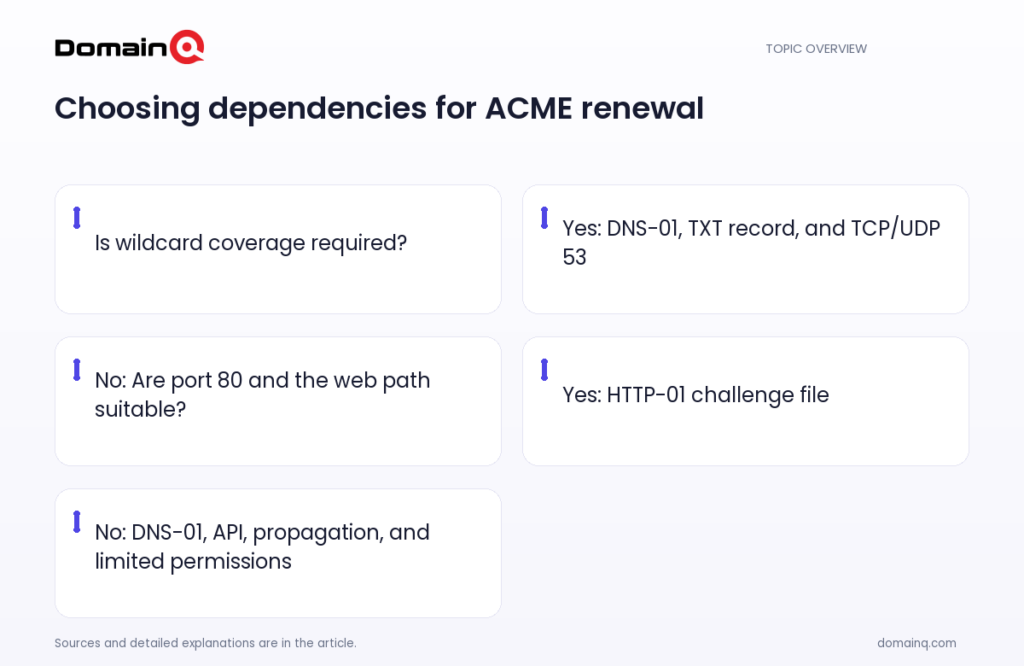
DNS-01 is required for certificates containing wildcard domain names. HTTP-01 cannot be used to issue wildcard certificates. That requirement alone determines the choice for some infrastructures.
DNS-01 can also work well with multiple web servers. It can validate domain names whose web servers are not exposed to the public internet. Therefore, where distributing a validation response across the web layer is difficult, or web servers are not publicly reachable, DNS-01 can be a more suitable option if DNS management can be automated.
- Clarify whether you need a wildcard certificate before choosing a method.
- For multiple web servers, compare HTTP-01 file distribution with centralized DNS-01 updates.
- If the web server is not exposed to the public internet, evaluate DNS-01.
Limit DNS-01 access and consider delegation
An important DNS-01 issue is where DNS API credentials are stored and how much authority they grant. Keeping full DNS API credentials on a web server significantly increases the impact if that server is compromised. Using more narrowly scoped API credentials, or performing DNS validation from a separate server and automatically copying certificates to the web server, are stated options.
The _acme-challenge subdomain can be delegated with CNAME or NS records to a separate DNS zone or server dedicated to validation. This can provide a dedicated management point for validation rather than opening the whole primary DNS zone to renewal automation. To track existing TXT records, you can also read Why Should Old TXT Records Be Cleaned Up in DNS-01 Validation?.
- Avoid keeping full-authority DNS API credentials on the web server.
- Use more narrowly scoped API credentials where possible.
- Consider performing DNS validation on a separate server and automatically copying the certificate to the web server.
- If needed, plan delegation of _acme-challenge with CNAME or NS to a validation-specific zone.
Source: [2]
Which method fits your existing infrastructure?
HTTP-01 may fit when inbound port 80 is available for the domain, you can reliably serve the challenge path on the web server, and you do not need a wildcard certificate. In a setup with one frontend or a manageable number of frontends, the dependency remains directly in the web layer.
DNS-01 should be evaluated when you need a wildcard certificate, challenge-file distribution is difficult across many frontends, or the validated domain’s web server is not exposed to the public internet. In return, you need a DNS provider API suitable for automation, propagation management, inbound TCP and UDP access on port 53 to authoritative DNS servers, and limited DNS API permissions.
Example scenario: A business site with two web servers can use HTTP-01 if both servers can serve the same challenge file over port 80. If the same business needs a wildcard certificate covering its subdomains, or file distribution becomes difficult as the number of frontends grows, DNS-01 is a better fit provided that its DNS provider offers a suitable API and authoritative DNS access is available.
- For HTTP-01: port 80, the challenge path, and availability across all frontends.
- For DNS-01: automated TXT updates, DNS propagation management, inbound TCP and UDP access on port 53, and limited API permissions.
- If wildcard coverage is required: DNS-01.
- For the machine running the client: outbound access on port 443.
Practical checklist
- Determine whether the certificate includes wildcard domain names; if it does, plan for DNS-01.
- If considering HTTP-01, check inbound port 80 traffic and availability of the /.well-known/acme-challenge/ path.
- With multiple frontends, verify that the HTTP-01 challenge file is available on every server or evaluate a centralized redirect design.
- If considering DNS-01, check whether your DNS provider has an API suitable for automating TXT updates.
- Configure the DNS-01 client to check DNS propagation or wait for an adequate period.
- Verify that authoritative DNS servers allow inbound TCP and UDP traffic on port 53.
- Clean up old _acme-challenge TXT records regularly.
- Limit DNS API credentials to narrow permissions; do not keep full-authority credentials on the web server. Verify outbound port 443 access from the machine running the ACME client.
The central difference between HTTP-01 and DNS-01 in ACME renewal is where the validation response comes from: HTTP-01 uses the web server, while DNS-01 uses a DNS TXT record. HTTP-01 can be a simple path when port 80 and the web path can be managed reliably. DNS-01 may be a better fit for wildcard certificates, many frontends, or web servers not exposed to the public internet, but its DNS API automation, propagation waiting, permission boundaries, and inbound TCP and UDP access on port 53 to authoritative DNS servers need to be managed.
Frequently asked questions
Can I use HTTP-01 validation on a different port?
No. HTTP-01 validation can only be performed on port 80, and the ACME standard does not allow clients to specify arbitrary ports.
Can HTTP-01 be used for a wildcard certificate?
No. DNS-01 must be used to issue wildcard certificates; HTTP-01 does not support wildcard certificates.
Does my web server need to be publicly accessible for DNS-01?
No. DNS-01 can be used to validate domain names whose web servers are not exposed to the public internet.
Why should port 53 be checked for DNS-01?
According to the Let’s Encrypt integration guide, inbound TCP and UDP traffic on port 53 must be allowed to authoritative DNS servers for all challenge types.